  • Body Worn Camera Devices

Body worn cameras are rugged, wearable devices used by frontline operational teams to capture video evidence during incidents and day-today operational activities. Designed to withstand demanding working conditions, these devices provide a reliable means of recording

interactions, incidents and site activity in environments where evidence capture is a practical operational requirement. These devices are deployed across a wide range of sectors including healthcare estates, aviation ground operations, facilities management, infrastructure and security operations - anywhere that reliable, tamper-evident video recording supports operational accountability.

A body worn camera is one component of a wider body worn video (BWV) system. The complete system also includes a digital evidence management platform used to securely store, manage and review captured footage - ensuring a clear and auditable chain of custody from recording through to review.

Motorola Body Worn Cameras

Motorola body worn cameras are widely deployed in operational environments such as security operations, infrastructure sites and large

commercial estates where reliable evidence capture and strong chain-of-custody protection are essential requirements. All Motorola body worn

devices integrate with the Motorola VideoManager digital evidence management platform, providing a structured workflow for footage upload,

storage, access control and review.

VB400

A rugged and reliable body worn camera designed for demanding

operational environments where durability and consistent

performance are non-negotiable.


  • One-touch incident recording
  • Pre-event video buffering
  • Encrypted video storage
  • Integration with Motorola VideoManager
  • Dock-based charging and automated upload

V200

A compact body worn camera designed for environments where a

smaller wearable form factor is preferred, whilst maintaining the

secure video capture capabilities expected of a professional BWV

device.


  • Compact form factor
  • Secure video capture
  • Docking system for evidence upload 
  • Integration with Motorola evidence management platforms

Together, the wearable device and evidence management platform form an integrated system that supports both real-time incident capture and post-incident review within a structured chain-of-custody framework.

Axon Body Worn Cameras

Axon body worn cameras are designed to integrate with the Axon Evidence platform, which provides a structured environment for incident

workflows, process automation and digital evidence management. Axon devices are frequently deployed in environments where incident

documentation, compliance reporting and structured video review are important operational requirements - including healthcare, retail and

facilities management settings.

Axon Body Workforce

A body worn camera designed specifically for commercial

operational environments, offering the features required to support

incident recording and evidence workflows in non-blue-light settings.


  • Incident recording with pre-event capture
  • GPS location tagging
  • Integration with Axon Evidence platform
  • Live video streaming capabilities.

Axon Body 3

An advanced body worn camera designed for high-quality video

capture and full integration with the wider Axon ecosystem,

supporting more complex operational and evidence workflows.


  • High-resolution video recording
  • Encrypted video storage
  • Automatic metadata tagging
  • Integration with Axon Evidence digital evidence platform

Together, the wearable device and evidence management platform form an integrated system that supports both real-time incident capture and post-incident review within a structured chain-of-custody framework.

Hytera Body Worn Cameras

Hytera body worn cameras integrate with Hytera communications systems and the SmartDEMS digital evidence management platform. These

devices are well suited to operational teams that require body worn video to work alongside communications infrastructure - including two way

radio networks and dispatch workflows - providing a unified approach to incident recording and operational communications.

VB400

A rugged and reliable body worn camera designed for demanding

operational environments where durability and consistent

performance are non-negotiable.


  • One-touch incident recording
  • Pre-event video buffering
  • Encrypted video storage
  • Integration with Motorola VideoManager
  • Dock-based charging and automated upload

V200

A compact body worn camera designed for environments where a

smaller wearable form factor is preferred, whilst maintaining the

secure video capture capabilities expected of a professional BWV

device.


  • Compact form factor
  • Secure video capture
  • Docking system for evidence upload 
  • Integration with Motorola evidence management platforms

Together, the wearable device and evidence management platform form an integrated system that supports both real-time incident capture and post-incident review within a structured chain-of-custody framework.

Choosing the Right Body Worn Camera

Selecting a body worn camera involves considerably more than choosing a device model. The right solution depends on the operational context

in which the equipment will be deployed and the wider systems it must work alongside. Organisations benefit from evaluating their requirements

across several practical dimensions before committing to a particular device or platform.

Working Environment

Consider the physical conditions of deployment - whether that is a busy healthcare estate, an outdoor

infrastructure site, or a large commercial facility. Ruggedness, IP rating and operating temperature

range may all be relevant factors.

Battery Life & Charging

Assess shift length and whether dockbased

charging and automated upload workflows are practical within existing operational processes.

Battery performance varies significantly between device models.

Device Mounting Options

Different operational roles require different mounting configurations. Ensure the device and its accessories are compatible with the uniforms, PPE

or equipment worn by operational staff.

Core DEMS Capabilities

  • Secure cloud or on-premise storage with encryption at rest and in transit
  • Role-based access control limiting footage access to authorised personnel
  • Audit logging recording every action taken on a footage file
  • Evidence categorisation enabling tagging by incident type, location or officer
  • Export tools for submission to police, legal teams or insurance providers
  • Retention policy management to comply with UK GDPR and organisational data schedules organisational data schedules organisational data.
  • Why a DEMS is Essential

    Operational footage frequently constitutes evidential material under UK law. A DEMS ensures that footage is handled with the same rigour as any other category of sensitive data — with controlled access, traceable handling and defined retention periods aligned to organisational and legal requirements.

    DEMS platforms are typically delivered as secure cloud-hosted services or on-premise installations, depending on organisational data governance policy.

    Foresolutions Managed Evidence Hosting (Hytera)

    For Hytera deployments, Foresolutions can host and manage the Hytera evidence platform (DEMS) within our managed cloud environment, providing a single point of support for platform availability, access management and operational administration. Hosting approach and data residency can be aligned to organisational governance requirements.

    Digital Evidence Platforms: Operational Models
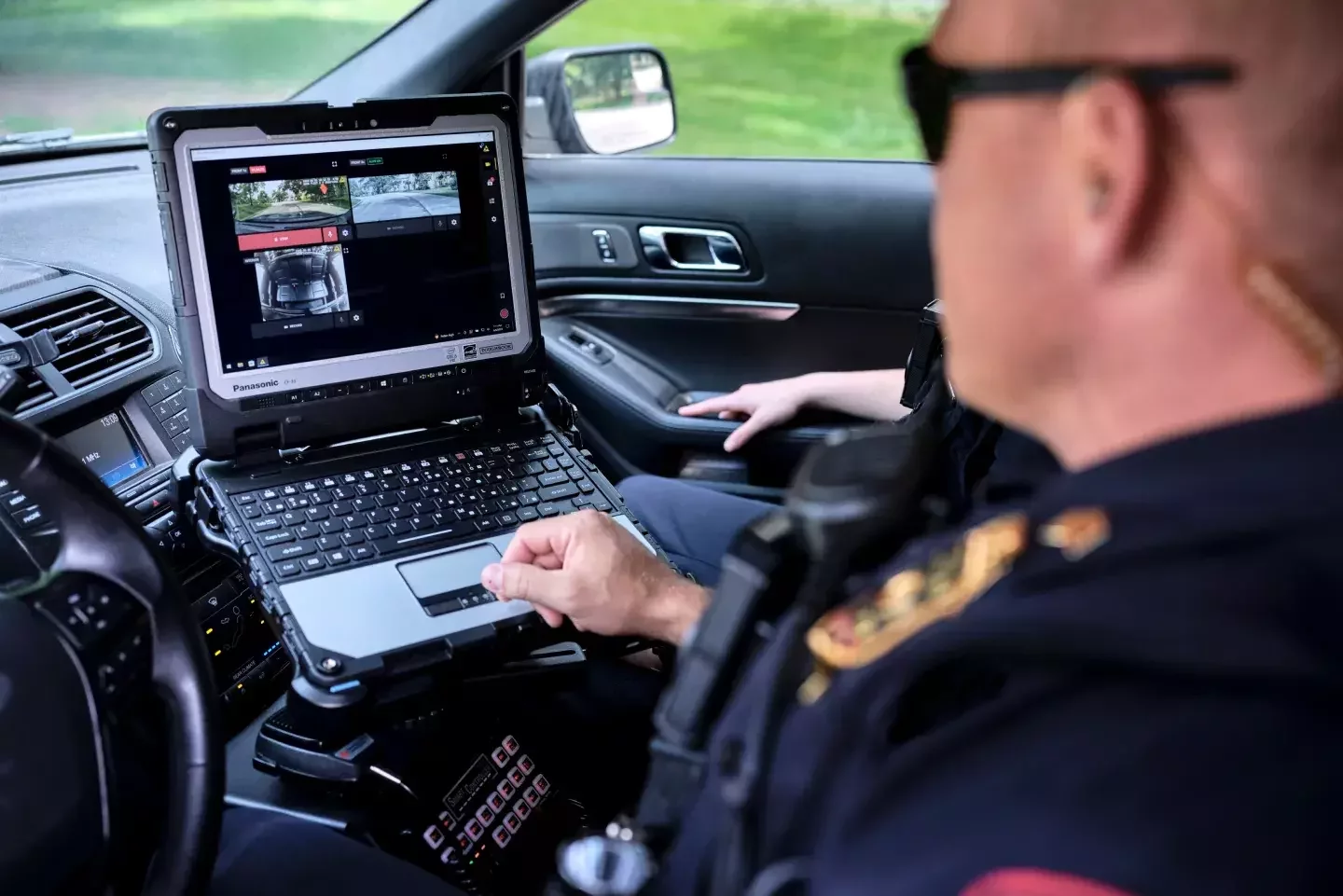
    Body worn video deployments rely on a Digital Evidence Management System (DEMS) to manage video recordings, control access, and support operational workflows.
    While camera hardware may appear similar across vendors, the software ecosystem behind the camera defines how organisations actually use body worn video in day-to-day operations.

    For many organisations the evidence platform becomes a liability management and productivity tool, helping teams resolve incidents, protect
    staff from false claims, and reduce administrative workload. Three dominant approaches exist within enterprise BWV deployments.

    Axon Evidence lifestyle image

    Axon Evidence – AI & Automation Platform

    Axon's ecosystem focuses heavily on automation and incident workflow efficiency, reducing the administrative burden associated with video evidence.

    Key capabilities include:

    Draft One AI – Automatically generates draft incident reports using body camera audio transcripts

    AI-assisted redaction – Automatically identifies and blurs faces, license plates and sensitive information

    Live awareness tools – Supervisors can view device locations and livestream video during incidents

    Automatic transcription – Recorded footage is transcribed, enabling keyword search across video archives

    This model is often selected in environments where incident reporting, privacy compliance and operational documentation place heavy demands on frontline staff.

    Typical sectors include healthcare security, public-facing environments and regulated organisations.
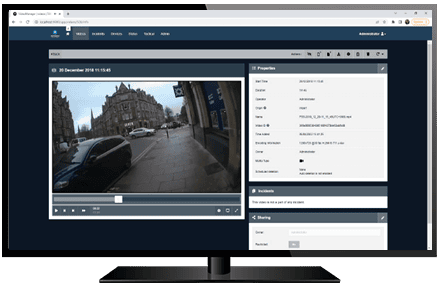
    Motorola Video Manager –Evidence Integrity Platform

    Motorola's BWV ecosystem prioritises forensic integrity and evidential reliability, making it well suited to environments where recorded footage may be used in formal investigations, litigation or internal disciplinary procedures.
    Key capabilities include:
    Record-After-The-Fact (RATF) – Ability to retrieve buffered footage from the camera if recording was not activated during an incident
    Incident collation tools – Evidence files, CCTV clips, photographs and documents can be grouped into a single case file
    End-to-end encryption – Video files are encrypted from capture through storage and playback
    CCTV integration – Synchronisation with Avigilon fixed camera systems allows incidents to be reviewed from multiple perspectives

    This approach is often selected where organisations require robust evidential processes and strong chain-of-custody protection. Typical sectors include guarding services, infrastructure operators and commercial estates.

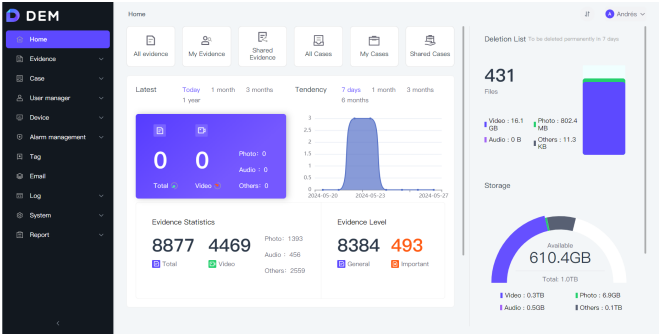
    Hytera SmartDEMS –Communications & Operations Platform

    Hytera's BWV ecosystem is designed to align closely with operational communications systems, treating the body camera as part of a broader Frontline device platform.

    Key capabilities include:

    Converged device management – Cameras and communications functions can be managed from the same platform

    Remote camera control – Supervisors can remotely trigger recording or capture high-resolution images when required

    Push-to-Talk integration (HyTalk) – Operators can communicate with field teams while viewing live video streams

    Operational search tools – Footage can be quickly located using user ID, time or location data


    This model is often selected by organisations that want body worn video

    integrated directly with operational communications and dispatch workflows.

    Managed Hosting for Hytera Deployments


    For Hytera deployments, Foresolutions can provide managed hosting and administration of the Hytera Digital Evidence Management

    System (DEMS) as part of a complete body worn video solution.


    This approach allows organisations to deploy BWV with:


  • Centrally managed evidence storage
  • Controlled user access and audit logging
  • Simplified operational administration
  • Integration with Hytera communications platforms where required

  • Managed deployments can simplify platform management for organisations that prefer not to operate evidence infrastructure

    internally.

    Comparing BWV Ecosystems

    Although body worn cameras may appear similar at device level, BWV deployments differ significantly depending on the software ecosystem
    and operational model chosen. Each platform typically aligns with a different operational priority.

    Axon

    Primary Model: AI-driven incident workflows

    Key Strength: Automated reporting & redaction

    Operational Advantage: Reduces admin workload for staff

    Typical Environments: Healthcare, regulated environments


    Motorola

    Primary Model: Evidence integrity & investigation

    Key Strength: Chain-of-custody & case management

    Operational Advantage: Strong evidential processes

    Typical Environments: Security, infrastructure, guarding


    Hytera

    Primary Model: Communications-integrated operations

    Key Strength: Real-time operational integration

    Operational Advantage: Converged communications & video

    Typical Environments: Logistics, events, operational teams


    The most suitable platform depends on the organisation's primary operational priority.

    For example:

    • organisations focused on reducing incident administration workload often favour AI-assisted platforms
    • environments with strong legal or investigative requirements may prioritise evidence integrity tools.
    • operational teams requiring communications and video in a single workflow may benefit from integrated platforms

    Selecting the right ecosystem requires understanding how body worn video will be used operationally, how evidence will be managed, and how the platform integrates with existing communications infrastructure.

    Body Worn Video Governance & Data Management

    Body worn video systems capture sensitive operational footage, often including interactions with members of the public, employees or contractors. For this reason, organisations deploying BWV should establish clear governance policies covering how recordings are captured, stored and accessed.

    Effective governance ensures that body worn video supports operational safety and accountability while protecting the rights and privacy of individuals.

    Data Protection Considerations

    Video recordings may contain personal data and should be managed in line with organisational data protection policies and applicable privacy legislation. Organisations typically define how recordings are stored, who can access them and how long they

    are retained. Clear policies help ensure that BWV deployments balance

    operational benefits with appropriate privacy safeguards.

    Retention Policies

    Organisations typically define retention periods depending on operational requirements, incident investigations and compliance obligations. Non-evidential recordings may be automatically deleted after a defined period, while footage linked to investigations may be retained for longer.

    Retention policies should be documented clearly as part of BWV
    governance procedures.

    Audit Logging & Accountability

    Digital evidence management platforms maintain detailed audit logs showing when footage is accessed, viewed or exported and by whom. 


    These records provide transparency and accountability, supporting internal reviews or external Investigations when required.

    Access Control & Permissions

    Access to recorded footage should be restricted to authorised personnel. Modern digital evidence platforms typically provide role-based access controls, allowing organisations to define which users can view, manage or export recordings.

    This helps prevent unauthorised access and ensures that footage is handled responsibly.

    Transparency & Operational Policy

    Organisations deploying BWV should ensure that staff understand when cameras are used, how recordings are stored and how footage may be used in investigations or operational

    reviews.

    Clear communication helps build trust in the technology and ensures that BWV deployments support both operational safety and responsible use of video evidence.

    Evidence Handling Procedures

    When footage is used as part of an incident investigation, organisations should follow documented evidence handling procedures to maintain integrity and traceability. Digital evidence platforms support this through controlled export processes and audit trails that record how footage has been handled.

    Plan a Body Worn Video Deployment

    Body worn video deployments require careful planning around evidence management, data governance, device policies and

    operational workflows. Our specialists work with healthcare estates, aviation operations and infrastructure operators to design BWV deployments that alignOur specialists work with healthcare estates, aviation operations and infrastructure operators to design BWV deployments that alignOur specialists work with healthcare estates, aviation operations and infrastructure operators to design BWV deployments that alignOur specialists work with healthcare estates, aviation operations and infrastructure operators to design BWV deployments that alignOur specialists work with healthcare estates, aviation operations and infrastructure operators to design BWV deployments that align

    with safety, compliance and operational requirements.


    •     Body worn camera device selection
    •     Evidence management platform planning
    •     Data governance and retention policy alignment
    •     Integration with existing radio and communications systems
    •     Deployment planning and user training
    Book a consultation
    Request a technical brief
    Body Worn Cameras - Case Study
    ​
    BUKO Group

    Industry Sector: Traffic management

    Golden Square Warrington brand Logo
    Buko group case study featured image
    Read the full case study

    Foresolutions works with BUKO Group to support frontline safety across complex traffic management operations through body-worn camera technology.


    Operating across large-scale road and infrastructure projects, BUKO required a solution that improved incident visibility while protecting a geographically dispersed workforce. Foresolutions supplied Hytera body-worn cameras integrated with existing radio communications, enabling real-time video capture, live streaming and clear evidence recording when incidents occur.

    Footage is automatically uploaded via centralised management software, ensuring secure, GDPR-compliant storage and fast access for review. The solution provides BUKO with greater situational awareness, improved lone-worker support and added reassurance for both staff and management in high-risk environments.

    Frequently Asked Questions

    What is a body worn camera?

    A body worn camera (BWC) is a device that is worn by law enforcement officers, security personnel, or other individuals, and is designed to capture video and audio recordings of their interactions with the public or in their work environment.

    Body cameras are typically small, portable cameras that are attached to the officer's uniform or equipment and can be activated manually or automatically. They record both video and audio, and may also have features such as infrared or night vision, GPS tracking, and live streaming capabilities.

    The use of body worn cameras has become increasingly popular in recent years as a way to promote transparency and accountability in law enforcement and security operations. The footage captured by these cameras can provide valuable evidence in investigations, and can also be used to monitor officer behavior and improve training programs.

    Which industries use body cameras?

    Body worn cameras are primarily used in law enforcement and security industries, but their applications are not limited to these fields. Here are some examples of industries that use body cameras:

    1. Law enforcement: Police officers, and other law enforcement personnel wear body cameras to record their interactions with the public and to provide evidence in investigations.
    2. Security: Security personnel, such as guards or bouncers, use body cameras to monitor their work environment and to document incidents that occur on the job.
    3. Healthcare: Healthcare providers use body cameras to record interactions with patients and to document medical procedures.
    4. Delivery and logistics: Delivery drivers and logistics personnel wear body cameras to document their deliveries and to provide evidence in case of disputes.
    5. Sports: Athletes and coaches use body cameras to capture training sessions and to analyse performance.
    6. Construction: Construction workers wear body cameras to document safety hazards and to provide evidence in case of accidents.

    Overall, body cameras are becoming increasingly popular in various industries as a tool for accountability, safety, and documentation.

    How important is video quality?

    Video quality is an essential aspect of body cameras, as it can impact the usefulness of the recorded footage. High-quality video can provide clear and detailed evidence that can be used in investigations or as part of training programs, while poor quality video may not be as useful and may even be inadmissible in court.

    There are several factors that can affect video quality, including the camera's resolution, frame rate, and bitrate. Higher resolution cameras can capture more detail, while higher frame rates can produce smoother video with less motion blur. Bitrate, which determines the amount of data used to encode the video, can also affect video quality, with higher bitrates producing less compression and higher fidelity.

    In addition to these technical factors, other elements such as lighting conditions, camera placement, and camera stability can also impact video quality. For example, cameras that are placed too low or too high, or that are subject to excessive shaking or movement, may produce blurry or distorted footage.

    Overall, video quality is an important consideration when selecting and using body cameras. It is important to choose a camera with appropriate technical specifications for the intended use, and to ensure that cameras are positioned and operated in a way that maximises video quality.

    How much storage will I need?

    The amount of storage you need for your body worn camera will depend on a variety of factors, including the length and frequency of your recording sessions, the resolution and frame rate of your camera, and the amount of compression used in your video files.

    As a general rule of thumb, a 64GB or 128GB storage capacity can provide sufficient storage for most users. However, it is important to note that the amount of storage you need will vary depending on how often you record, how long your recording sessions are, and the resolution and frame rate of your camera.

    If you plan to record frequently or for extended periods of time, you may want to consider investing in a camera with a larger storage capacity or using an external hard drive or cloud storage solution to store your video footage.

    It is also important to consider how you will manage and store your footage. Some cameras may come with software or tools that can help you organize and manage your video files, while others may require manual file management. It is important to have a plan in place for storing and accessing your footage, especially if it is being used for legal or evidentiary purposes.

    Where is my video footage stored?

    The storage location for your video footage will depend on the type of body worn camera you are using and the settings you have configured.

    Some cameras have built-in storage that saves the footage directly onto the device, while others may use removable memory cards or connect to external storage devices. Some cameras may also have cloud storage options that allow you to upload and store footage remotely.

    In addition to the camera itself, your video footage may also be stored on your computer or other devices when you transfer it for backup or analysis. It is important to have a clear understanding of where your video footage is stored, especially if it is being used for legal or evidentiary purposes.

    If you are using body worn cameras for law enforcement or security purposes, there may be specific regulations and guidelines for how and where footage can be stored, and who can access it. It is important to be familiar with these regulations and to follow best practices for data security and privacy.

    Can employees of my company remotely view my video footage?

    Whether members of your company can remotely view your video footage will depend on the specific policies and settings in place for your body worn camera system.

    Some camera systems may have remote viewing capabilities built in, allowing authorized users to access and view footage from a remote location. This can be useful for supervisors or other personnel who need to monitor or review footage in real time.

    However, it is important to ensure that access to your video footage is controlled and limited only to authorised personnel. This can help to protect the privacy and security of individuals who may be recorded on the footage.

    Additionally, if you are using body worn cameras for law enforcement or security purposes, there may be specific regulations and guidelines for who can access and view footage. It is important to be familiar with these regulations and to follow best practices for data security and privacy.

    Ultimately, it is important to establish clear policies and guidelines for accessing and sharing video footage, and to ensure that all users are trained on these policies and understand their responsibilities for protecting the privacy and security of the footage.

    How secure is my stored video footage?

    The security of your stored video footage will depend on several factors, including the type of storage you are using, the security measures in place for your camera system, and the policies and practices in place for managing and accessing the footage.

    If you are storing your video footage on a physical device such as a memory card or external hard drive, it is important to take steps to protect the physical security of the device. This can include storing the device in a secure location, using encryption or password protection to restrict access to the footage, and backing up the footage regularly to prevent data loss.

    If you are using cloud storage to store your video footage, it is important to choose a reputable and secure provider that uses encryption and other security measures to protect your data. It is also important to follow best practices for data security, such as using strong passwords and regularly updating your security settings.

    In addition to these technical measures, it is important to establish clear policies and procedures for managing and accessing your video footage. This can include restricting access to authorized personnel only, implementing protocols for handling sensitive or confidential footage, and providing training and education for all personnel who will be involved in managing or accessing the footage.

    Ultimately, the security of your stored video footage will depend on a combination of technical measures and best practices for data security and privacy. It is important to take a comprehensive approach to protecting your footage, and to regularly review and update your security measures to ensure that they are effective and up-to-date.

    What are the differences between streaming cameras from other cameras?

    The main difference between streaming cameras and other cameras is that streaming cameras are designed to transmit live video over the internet in real-time, while other cameras typically store video footage locally on a physical storage device.

    Streaming cameras typically connect to a network via Wi-Fi or Ethernet, allowing the user to stream live video from the camera to a remote location over the internet. This can be useful for remote monitoring, video conferencing, or live streaming events.

    Other types of cameras, such as body worn cameras or security cameras, are typically designed to record video locally onto a physical storage device, such as an SD card or hard drive. This footage can then be transferred to a computer or other device for viewing or analysis.

    Streaming cameras may also have different features or capabilities than other types of cameras, depending on their intended use. For example, some streaming cameras may have built-in microphones or speakers for two-way audio communication, while others may offer advanced video processing or image stabilization to improve the quality of the live stream.

    Overall, the main difference between streaming cameras and other cameras is their ability to transmit live video over the internet in real-time, which can be useful for a wide range of applications and use cases.

    Can I stream live footage over both a Wi-Fi network and a mobile network?

    Yes, you can stream live footage over both a Wi-Fi network and a mobile network, as long as your streaming camera and network connection support this functionality.

    Most streaming cameras are designed to connect to a Wi-Fi network, as this is typically the most reliable and cost-effective way to transmit live video over the internet. However, many cameras also support mobile network connectivity, allowing you to stream live video over a cellular network when Wi-Fi is not available or when you need to transmit video from a remote location.

    To stream live footage over both Wi-Fi and mobile networks, you will need a streaming camera that supports dual connectivity, as well as a network connection that provides sufficient bandwidth and coverage to support your streaming needs. This may require a mobile data plan with sufficient data allowances, or a dedicated data connection such as a 4G LTE router.

    It is also important to note that streaming video over a mobile network can use a significant amount of data, which may result in additional charges or data caps. You should always check with your network provider to understand the data usage and costs associated with streaming live video over a mobile network, and to ensure that you have a plan that meets your needs.

    What device charging options are available?

    There are several device charging options available for streaming cameras, including:

    1. AC power adapter: Many streaming cameras come with an AC power adapter that can be plugged into a wall outlet to power and charge the camera.
    2. USB cable: Some streaming cameras can be charged using a USB cable connected to a computer or other device with a USB port. This can be a convenient option for charging on the go or when traveling.
    3. Power bank: A power bank is a portable battery pack that can be used to charge a streaming camera when AC power or a USB connection is not available. This can be a useful option for outdoor activities or remote locations where access to power is limited.
    4. Docking station: Some streaming cameras come with a docking station that can be used to charge the camera and transfer data. This can be a convenient option for managing multiple cameras and keeping them charged and ready to use.

    It is important to note that the charging options available will depend on the specific camera model and manufacturer, so it is always a good idea to check the user manual or product specifications to understand the charging options and requirements for your camera.

    How do I securely attach a body camera to myself?

    To securely attach a body camera to yourself, you should follow the manufacturer's instructions and best practices for your specific camera model. However, here are some general tips that may be useful:

    1. Choose the right location: The placement of your body camera will affect the quality of the footage and how secure it is. Consider where you will be wearing the camera and what activities you will be doing. Make sure the camera is not obstructed and has a clear view of the area you want to capture.
    2. Use a secure mounting option: Most body cameras come with a variety of mounting options, such as clips, straps, or magnets. Choose a mounting option that is secure and comfortable for your body type and the activities you will be doing. Make sure the camera is snug and does not move around too much.
    3. Consider a protective case: If your camera does not come with a protective case, consider purchasing one to protect the camera from damage and keep it secure while you are wearing it.
    4. Be mindful of privacy: When attaching a body camera, be mindful of privacy concerns and respect the privacy of others. Make sure the camera is not pointed at sensitive or private areas and inform others if you are recording in a public space.
    5. Test the attachment: Before using the camera in the field, test the attachment to make sure it is secure and comfortable. Move around and try different activities to see how the camera performs and if any adjustments need to be made.

    By following these tips, you can help ensure that your body camera is securely attached to your body and ready to capture high-quality footage.

    Get In Touch For A Quote